How to choose union management software: a buyer's guide for unions
What union management software should do for your union, the questions to ask every vendor, how pricing works, and how to move your records over safely.
Union management software keeps a labor union’s records in one place: the member roster, grievances and discipline, dues, documents, and messages to members. Most unions start looking when the spreadsheets, paper files and email threads stop keeping up, or when an officer leaves and takes half the records with them.
The choice usually falls to the president, the secretary-treasurer or the executive board. Many of them are volunteers fitting union work around a full-time job, so the search has to be quick and still get it right.
Signs your union has outgrown spreadsheets
- There are several versions of the member list, and nobody is sure which one is right.
- A grievance deadline slipped because the dates lived in one steward’s notebook.
- An officer or steward left, and their files, notes and email went with them.
- Answering “who’s behind on dues?” takes an afternoon.
- The board asks how many grievances were filed this year, and someone has to count by hand.
- Stewards can’t look anything up from the worksite.
If two or three of these sound familiar, it’s worth a look.
What union management software does
Most products are built around the same core, though they differ a lot in the details.
- Member database. One roster everyone works from: contact details, worksite or department, status, seniority, and each member’s history. Everything else connects to it.
- Grievances and discipline. Cases that follow your contract’s steps, with deadlines and reminders, notes and files kept with each case.
- Dues. Who’s current and who’s behind, payroll deductions and checks recorded, and sometimes online payments.
- Documents and forms. Your grievance forms and letters filled in from the record, and files stored where the next officer can find them.
- Communication. Email to the membership, and a way for officers and stewards to talk to each other.
- Tasks and calendar. Who’s doing what, and when it’s due.
- Reports. Membership numbers, case outcomes and workload, ready for the board.
Some software is built for specific kinds of unions. Building trades unions, for example, often need hiring hall dispatch and apprenticeship tracking. Public-sector unions usually don’t. Know which group you’re in before you start comparing.
Start with your union’s needs, not the feature list
Feature lists all look alike. Before you talk to vendors, write down a few answers:
- Who will use it? Just the officers, or every steward too? How many people need to sign in?
- How many members do you have, and how many do you expect in three years?
- How are dues paid? Payroll deduction, checks, cash, or online? Does the employer send a remittance file?
- What do you track today, and where? Make a list of every spreadsheet, binder and inbox.
- What has to happen on a phone? Stewards at the worksite usually need to look up members and add notes.
- What’s the budget, and who has to approve it? Will the board want monthly or yearly billing?
Bring these answers to every demo or trial. They keep the conversation on your local instead of the vendor’s slides.
Must-haves for most unions
- A single roster. Every case, payment and message should connect to the member it belongs to.
- Your contract’s grievance steps, with the time limits and reminders set to match your contract’s language.
- Access by role. Officers see everything, stewards see what they need, and members’ private information stays private.
- It works on a phone. If stewards can’t use it at the worksite, they’ll go back to their notebooks.
- Records stay with the union. When an officer or steward moves on, their cases, notes and files stay where the next person can pick them up.
- You can get your data out. You should be able to export your member list at any time, in a format a spreadsheet can open.
- Backups. Ask how often, and where the copies are kept.
Questions to ask every vendor
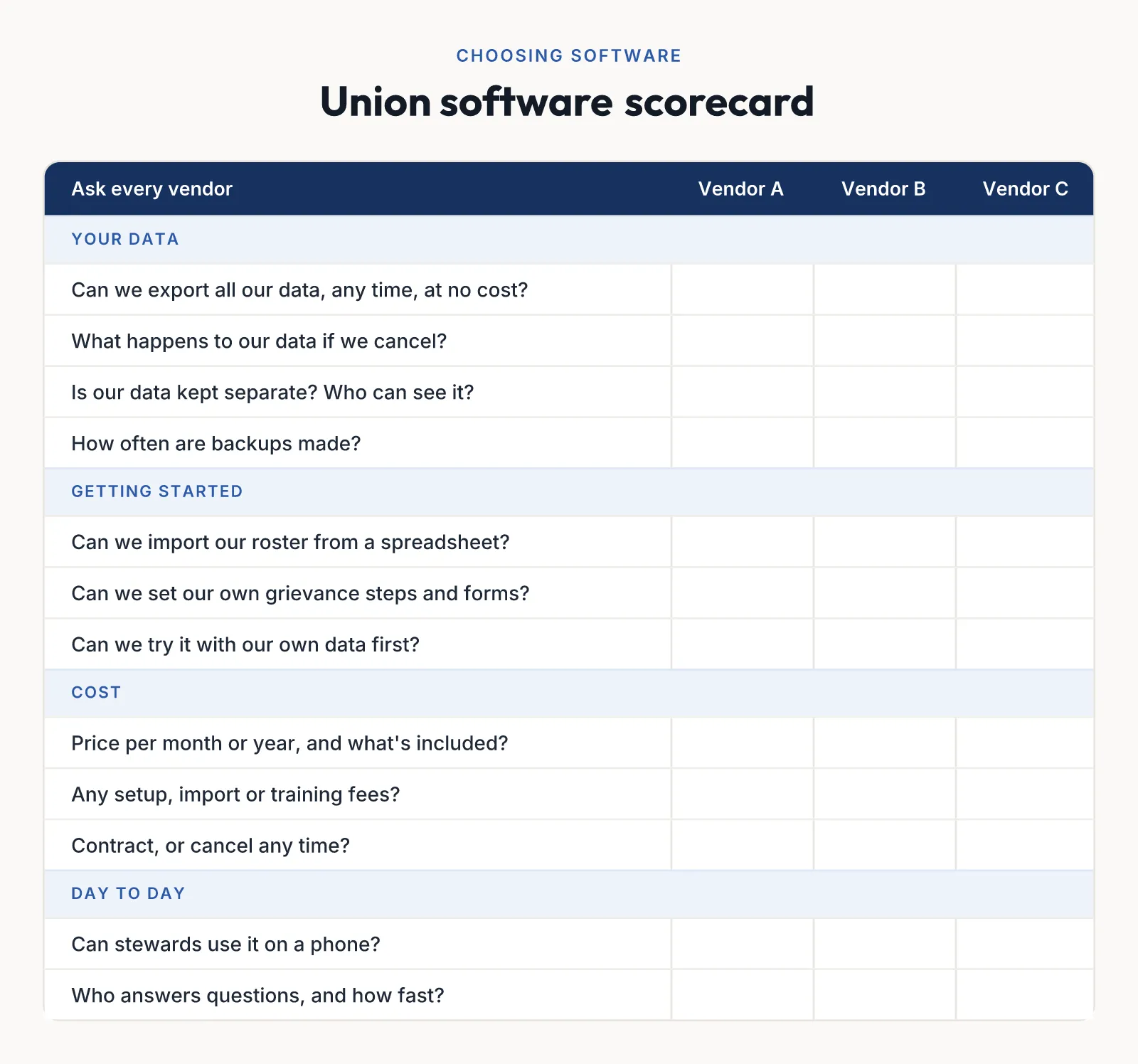
Print this scorecard and fill in a column for each product you look at.
About your data
- Who owns our data? Can we export all of it, at any time, without paying extra?
- What happens to our data if we cancel? How long do you keep it, and when is it deleted?
- Is our union’s data kept separate from other customers’? Who at your company can see it?
- How often do you back up, and have you ever restored a customer’s data?
About getting started
- How do we get our roster in? Can we import a spreadsheet, or do you do it for us?
- Can we set up our own grievance steps, forms and letters, or is that a paid service?
- How long does a typical union take to get up and running?
About cost
- What does it cost per month or per year, and what’s included at each level?
- Are there setup, import or training fees?
- Is there a contract, or can we cancel any time?
- Can we try it with our own data before we pay?
About support
- Who answers when we have a question, and how fast?
- Is there a help center our stewards can use on their own?
Ask for answers in writing, especially about data and cancellation. A vendor that won’t say plainly how you get your data back is telling you something.
How pricing usually works
You’ll see a few common models:
- Per member. The price grows with your membership. This can get expensive for large unions with few active users.
- Per user. You pay for each officer or steward who signs in. Watch how this adds up if every steward needs access.
- Flat plans. A set price for a range of members and users, usually monthly or yearly with a discount for paying yearly.
- Custom quotes. Common for large unions, councils and districts, and for software that needs a lot of setup.
Ask about setup, import, training and support fees too. They can cost as much as the first year’s subscription. A free trial or free plan lets you test with real data before the board has to vote.
Union software or a general-purpose tool?
Some unions try a general CRM, association software built for trade associations, or a shared drive with better spreadsheets. These can work, but they weren’t built for how a labor union runs. Expect to spend time making them understand grievance steps, bargaining units, stewards and dues. Software made for unions comes with those already built in, so your setup time goes into your own contract’s details.
Moving over without losing anything
- Clean the roster first. Remove duplicates, fill in missing contact details, and agree on one status for each member. A member roster template helps.
- Bring open cases over next. Active grievances and their deadlines matter more than ten years of closed files.
- Run both for a short time. Keep the old system read-only for a few weeks while everyone gets used to the new one.
- Train the people who’ll use it daily. Stewards first, with a short session on looking up members and adding notes from a phone.
- Decide who owns the system. One officer should be responsible for user access and keeping the roster current.
Getting the board’s approval
Boards approve what they understand. Bring a one-page summary: the problem in your own words, the product you recommend, the cost per month and per year, how you’ll move the records, and what happens to the data if you ever leave. If you can, show them the trial with your own data.
Where LaborWise fits
LaborWise is union management software built for labor unions. The member database is the center, with grievances and discipline, forms and e-signatures, tasks, documents, a calendar, team chat, member email, dues and reports built around it. It works on any phone, and you can export your members at any time. There’s a free plan for small unions, and every union starts with 30 days of Pro free, no credit card needed. See pricing or the full list of features, and use the scorecard above to compare it with anything else you’re considering.